Skip to content

Managed WordPress with a static public site

Every Cloud site has a private WordPress where you edit and a public site of finished pages that keeps serving, even while WordPress is paused.

One site on Staatic Cloud
Your WordPress Paused

Private, on its own address, behind a password prompt.

  • WordPress and the Staatic pluginPHP 7.4 to 8.5
  • Databasein phpMyAdmin
  • Filesover SFTP

Pauses when unused.

Publishcopies the changed files
Your public site Serving

Finished pages, so no visitor waits for WordPress.

  • Forms and searchhandled by Staatic
  • Close to every visitor250+ locations worldwide
  • Live addressyour domain, free SSL
  • Preview addresshidden from search engines

Optional origin rule: send one path, such as an API, to your WordPress or your own server.

Every Cloud site gets both parts, from €28 a month. See the prices.

Most days, only the public site is working

Your WordPress only needs to run while you edit and publish.

You click Publish

Publish from the WordPress toolbar, or let Staatic publish after each edit. Only changed files are uploaded, and visitors see them within minutes. Publish to the preview address to check first.

Nobody edits for a while

Your WordPress pauses after 15 minutes without use, and a paused WordPress runs no code at all. It starts again when you open it, and scheduled posts still go out. Visitors notice nothing.

An update breaks WordPress

The public site keeps serving your last publication while you restore the database, the files or both. Publish again only once WordPress works, since a publication copies whatever is in it.

A post gets shared widely

Every request is answered from the published files, so your WordPress can stay paused. You pay for bandwidth, not visits.

One path has to stay live

An origin rule sends one path, such as an API, to your own server, or to your WordPress with the always-on add-on. Logins, carts and checkouts run elsewhere, such as a shop on a subdomain.

Your WordPress, set up for you and open to change

We run the server. You keep the access you’d have on your own: files over SFTP and the database in phpMyAdmin.

Hosted in the EU: your WordPress, its backups and your Staatic account. Where your data lives

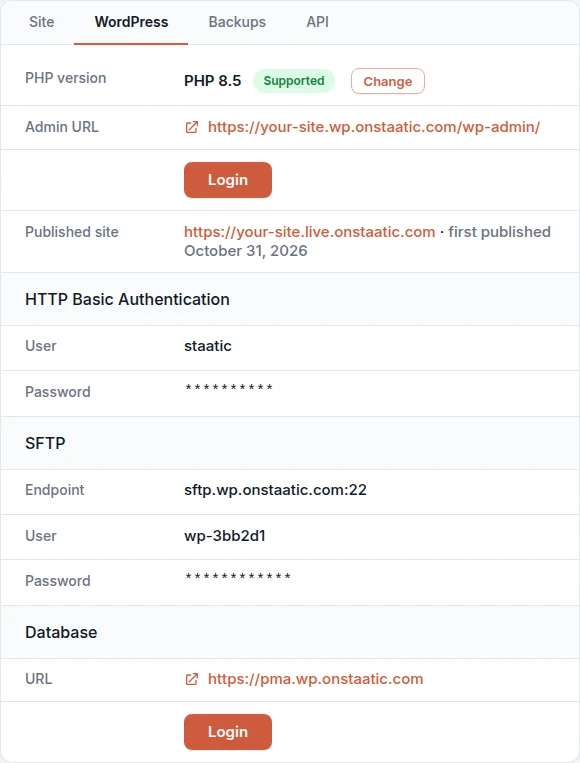
The WordPress tab of a site in the Staatic dashboard: the PHP version with a Change button, the WordPress admin URL with a Login button, the published site, HTTP Basic Authentication and SFTP credentials with hidden passwords, and a Login button for the database in phpMyAdmin.
The WordPress tab in the Staatic dashboard.
Backups Automatic, on a fixed schedule
Daily
02:00 UTC
kept 7 days
Weekly
Mondays, 04:00 UTC
kept 3 weeks
Monthly
the 1st, 06:00 UTC
kept 3 months

Plus your own, whenever you want one.

Files and database, stored encrypted away from WordPress. Restore either or both, or download a copy.
The PHP version you choose
Switch between PHP 7.4 and 8.5 in the dashboard. The public site stays up while WordPress restarts.
Updates when you decide
We don’t update themes, plugins or major WordPress versions for you. WordPress installs its own minor security releases.
Login links for your team
Anyone with access to the site opens WordPress from the dashboard with a short-lived login link, so nobody shares a password.
WordPress Multisite on request
We set up subdomain networks for you. Each subsite counts as an extra site.

Your own domain, served over HTTPS

Amazon CloudFront serves your site from 250+ locations (400+ on Enterprise), close to each visitor.

HTTPS
A free certificate for your domain, renewed automatically. HTTP redirects to HTTPS, with TLS 1.2 or newer.
HTTP/2 and HTTP/3
HTTP/3 where the browser supports it, which helps on patchy mobile connections. HTTP/2 for the rest.
IPv6
Reachable over IPv6 as well as IPv4.

How fast the same page loads from Staatic and from WordPress.

Measurements

What a scanner finds on a Staatic site.

Security

No lock-in: import your site, download it any time

Make a backup with All-in-One WP Migration, UpdraftPlus, Duplicator or your cPanel or DirectAdmin panel on your current host, or pack your WordPress files and database in a ZIP or tar.gz, and the import brings it in. To leave, download any backup: all files and an SQL dump.

Moving a site to Staatic Cloud

  1. Your current host serves visitors Create a Cloud site

    WordPress comes with the Staatic plugin. We email you when it is ready.

  2. Import your backup

    Upload an All-in-One WP Migration, UpdraftPlus or Duplicator backup, or a ZIP or tar.gz of your files and database. Large ones go over SFTP.

  3. Check it, then publish

    Look it over, then publish to its onstaatic.com address.

  4. Staatic Cloud serves visitors Point your domain

    Add the DNS records the dashboard shows.

Bringing a site in

The import replaces your new WordPress’s files and database, after making a restore point. The public site doesn’t change until you publish. Read how to import a site.

Import into example.com WordPress tab > Import from backup
  1. Choose backup (done)
  2. Check backup (done)
  3. Review & confirm (done)
  4. Import
  5. Result

Backup check

File
backup-example-com.zip
Format
WordPress files + database (ZIP)
Detected source URL
https://example.com
Detected site title
Example

Importing your WordPress site

  • Create restore pointDone
  • Import files, database, and URLsDone
  • Check imported WordPress siteRunning
The import drawer in the Staatic dashboard.

Taking it with you

  • Keep it static without us: the free plugin publishes it to your own hosting.
  • Download any backup: all files and an SQL dump, ready for any WordPress host.
  • Keep a copy elsewhere too, so you never rely on one provider.
  • Cancel the renewal any time; your plan runs until the end of the paid period.

Before you move

Does my site go offline during the move?
No. Your current host serves visitors until you change the DNS records, and for up to 2 hours while the change spreads. Keep the old hosting until the dashboard shows the domain as Active.
Can I use my root domain?
Yes, if your DNS provider supports ALIAS, ANAME or flattened CNAME records, which not every provider does. Enter the www. name and Staatic serves both, redirecting to the one you choose.

Run your site on Staatic Cloud, free for 14 days

One Cloud site with its own WordPress and team access. Import your site or start a new one. If the trial ends without a plan, you aren’t charged.

  • No payment details needed
  • The trial ends automatically
  • You keep editing in WordPress

Cloud Starter is €28 a month for one site. Professional and Enterprise add more sites, team seats and origin rules.

Pricing