Your WordPress forms, without WordPress behind them
Contact Form 7, Divi, Gravity Forms and WPForms keep working on your static site. Visitors send them to Staatic, which filters out spam and passes the rest on to you.
Your form posts to Staatic, not to WordPress
When you publish, Staatic points each form on your site at its own form endpoint. Visitors send their submission there, so the public site has no form handler to attack, and WordPress takes no part in the request.
-
When you publish
Staatic finds your forms and sets where they are sent. You keep building them in WordPress as usual.
-
When a visitor sends one
The submission goes straight to Staatic and is stored there. Your WordPress isn’t involved.
-
After the spam checks
Staatic emails your team, replies to the visitor or calls a webhook, whichever you set up.
On Staatic Cloud your WordPress stays private behind a password prompt and pauses when idle. Your forms keep working either way.
You see every submission in WordPress under Staatic > Forms, and in the Staatic dashboard. Both show the same submissions.
Visitor’s browser
Contact form on a static page
Staatic Forms
Stores it, checks for spam
- Autoresponse
- Webhook
Thank-you page
Back on your static site
Your WordPress
Not involved
Connect the forms you already have
Forms are part of Premium, so every paid plan includes them, Staatic Cloud too. Switch them on once in WordPress, under Staatic > Settings > Integration.
Popular form plugins connect automatically
These connect when you switch on forms integration. Each form also gets a hidden honeypot field that catches bots.
- Contact Form 7
- Divi Contact Form
- Gravity Forms
- WPForms
Any other HTML form, with two attributes
Give the form tag a name and a data-staatic attribute. Staatic finds it the next time you publish.
<form data-staatic="true" name="Contact">Add data-staatic-redirect-url to send visitors to your own thank-you page. Without it, they see a Staatic thank-you page.
What stays on a live site
Form plugins that send through AJAX, such as Ninja Forms, Fluent Forms and Forminator, don’t work as static forms, and neither do multi-page forms that a plugin runs on the server. Rebuild them in one of the plugins above. A step-by-step form that runs in the browser and sends everything at once works fine. See what works on static
Shortcode IDs for Contact Form 7, honeypot fields and every form option.
Forms docsSpam is stopped before anyone is notified
Anyone can reach a form, so every submission goes through the form’s checks in order. The first one it fails marks it as spam, and only a submission that passes them all sends your notifications.
-
Honeypot A hidden field only bots fill in. Connected plugins’ forms get one automatically.If it fails: Spam
-
reCAPTCHA If set Checked with Google, using your own keys.If it fails: Spam
-
Akismet Checks the message and who sent it.If it fails: Spam
-
Verified Your notifications go out.
Where spam lands in WordPress, and how to review it.
Spam protection docsThen it goes where you want it
Set up as many notifications as you like, for one form or for every form. Each verified submission runs all that apply.
-
Email to your team
Send it to one or more addresses. When the visitor leaves an email address, replies go straight to them, so your team answers from their own inbox.
-
Autoresponse to the visitor
Thank them in your own words, with their answers filled in from the form. Sent when the visitor leaves an email address.
-
Webhook to your tools
Staatic posts the submission as JSON to a URL you choose, such as a Zapier trigger.
If a form gets submissions and no notification is set up for it, we email you, so a new form doesn’t go unnoticed.
Send verified submissions to a sheet, a CRM or a task list with the Staatic app on Zapier.
Zapier integrationRead and export every submission
Submissions are stored with Staatic, not as WordPress posts, so your WordPress database stays as it was. Open them in WordPress or in the Staatic dashboard. No lock-in: export every submission whenever you like, and your forms stay ordinary WordPress forms.
- Everything in one place
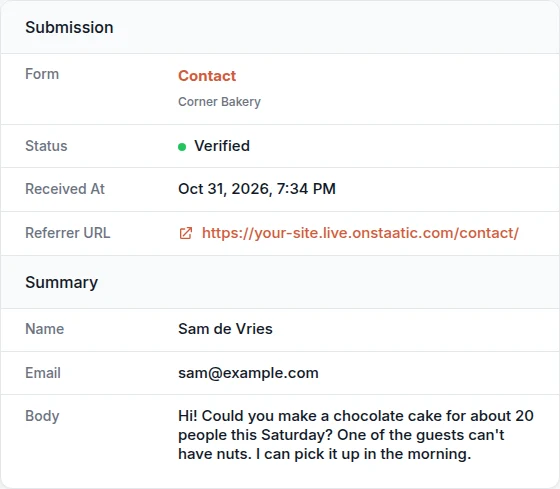
- Each submission shows the fields, the page it was sent from and any files the visitor attached, ready to download.
- A spreadsheet per form
- Export a form’s submissions as a CSV file that opens in Excel, Google Sheets or LibreOffice with accented characters intact. In the dashboard you can pick a date range. IP addresses aren’t exported.
- Let a client handle their own
- Give someone the Form Moderation permission on one site. They review its submissions without access to backups, integrations or the database. See how agencies use it
- Script it
- Developers can download the same CSV file from the Staatic API with a site token. See the API export
| Submitted at (Europe/Amsterdam) | Status | Name | Message | Referrer URL | |
|---|---|---|---|---|---|
| 2026-10-20 09:15:42 | Verified | Sam de Vries | sam@example.com | Could you quote for a site of about 40 pages? | https://example.com/contact/ |
| 2026-10-21 14:02:07 | Verified | Ana Lima | ana@example.com | Is the Saturday workshop still open? | https://example.com/events/ |
Export from the dashboard, from WordPress or through the API.
Exporting submissionsBefore you switch your forms over
- Does the free plugin handle forms?
- No. Forms are part of Premium, so they come with every paid plan, Staatic Cloud included, and with the free trial. The free plugin publishes your pages but doesn’t receive submissions. Compare the plans
- Does spam count toward my plan?
- No. Only verified submissions count toward the 500 submissions a month your plan includes, shared by every site in the account. Use beyond that is billed at the rate on the pricing page.
- Can visitors attach files?
- Yes. Attachments show up in the submission as files you can download. Size limits are in the docs. See the forms docs
- Do I have to change how I build forms?
- No. You keep editing them in WordPress with the same plugin. A change goes live the next time you publish.
- What happens when the trial ends?
- If you haven’t chosen a plan, form handling pauses along with publishing and search, and we email you. You aren’t charged. Choose a plan to start them again. Account and free trial
Try it with your own forms, free for 14 days
Forms come with the trial. Publish your site and send a test submission to see it arrive.
- No payment details needed
- The trial ends automatically
- You keep editing in WordPress
Every paid plan includes forms and a monthly number of submissions.
Pricing