Static WordPress SEO checklist
Moving WordPress behind a static public site can simplify serving, caching, and public runtime exposure. It does not make a launch SEO-safe by default.
Search engines still evaluate URLs, links, status codes, canonical tags, sitemap entries, metadata, and robots directives. If those signals disagree, the static build may pass a visual review while crawlers find origin URLs, preview hosts, redirected sitemap entries, or conflicting canonicals.
Use this checklist if you own, build, or review a static or hybrid WordPress launch. Use it to keep one URL model consistent across WordPress, the generated static output, the deployment target, and Search Console.
Before you begin
Treat static publishing as a release process, not a hosting toggle. The generated files can preserve bad canonicals, stale redirects, missing media, and preview URLs exactly as they were built.
- Do not assume that HTML output is automatically indexable, canonical, or complete.
- Do not rely on the WordPress origin as proof that the published static site is correct.
- Do not let preview, staging, or origin hosts become alternate public versions of the same site.
- Do not leave redirects, sitemaps, and canonical tags until launch day.
If the migration changes domains, paths, permalink format, trailing slash behavior, archive structure, or public hosting, use this as a migration checklist. If the URLs stay the same and only the delivery model changes, still run the validation. Static delivery can preserve mistakes that might otherwise stay hidden inside WordPress templates, plugin output, or server rules.
Static publishing is usually straightforward for marketing pages, articles, documentation, resource libraries, and landing pages. Plan a hybrid path for account pages, gated content, checkout, personalized content, live inventory, and search or filtering that must be generated at request time.
If you only check five things
These five checks catch the most damaging static WordPress SEO mistakes.
-
Public URL consistency.
Canonicals, sitemap URLs, internal links, Open Graph URLs, structured-data URLs, hreflang targets, and redirect targets should not point to the WordPress origin or preview host. -
Sitemap quality.
The sitemap should contain only canonical, indexable, public URLs that return200. Do not list redirected ornoindexURLs. -
Redirect behavior.
Old URLs should redirect directly to relevant final URLs with permanent server-side redirects where possible. Avoid chains, loops, temporary redirects for permanent moves, and homepage dumping. -
Preview and origin controls.
Non-production URLs should be password-protected or correctlynoindex. Do not rely onrobots.txtalone to keep preview HTML out of Search. -
Artifact inspection.
Validate the generated static output and deployed HTTP behavior, not only the WordPress origin.
Phase 1: crawl the current site before changing delivery
Start by documenting what search engines can already discover.
For a small site, this can be a spreadsheet. For a larger site, use a crawler and export the data. Keep the pre-migration crawl so you can compare it with the static output later.
At minimum, capture:
- indexable URLs
- status codes
- canonical URLs
- title tags and meta descriptions
- meta robots directives
- sitemap membership
- internal links
- redirecting URLs
- image, PDF, and download URLs that receive traffic
- archive, category, tag, author, and paginated URLs
Static migrations often fail in places the homepage does not show. A category archive, /page/2/, old PDF URL, or legacy landing page can be the URL that loses search visibility.
For an existing migration plan, this phase lines up with the broader WordPress to static site migration checklist. That article covers fit, dynamic dependencies, and launch operations. This guide focuses on the SEO-specific checks.
Phase 2: make the public URL the source of truth
One rule drives most of the checklist: the public destination URL must be the URL every generated signal agrees on.
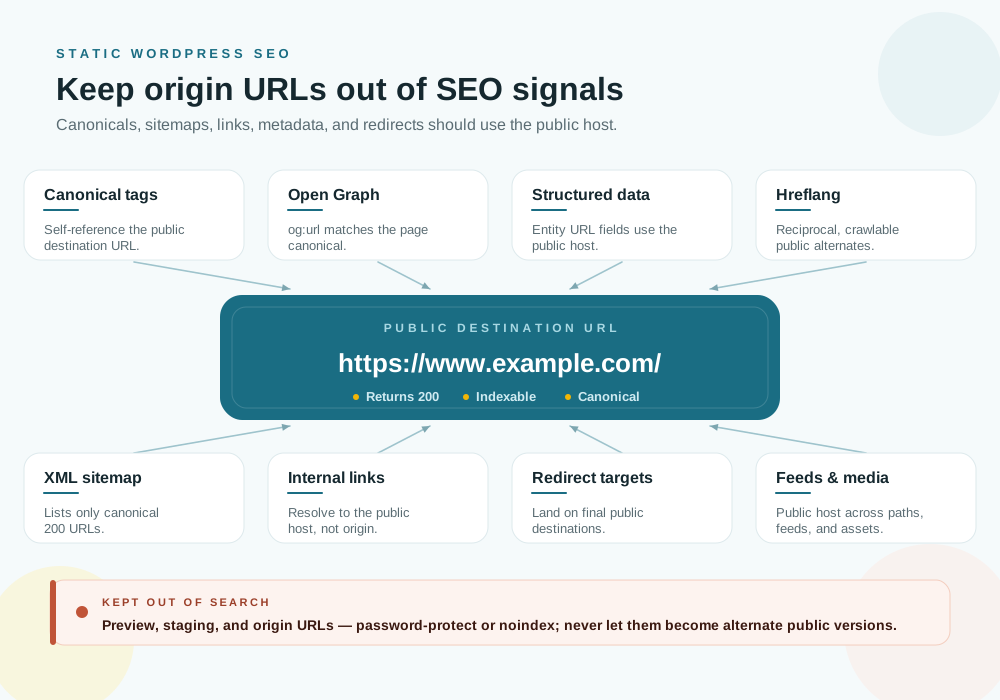
In a static WordPress architecture, WordPress often moves to a hidden or protected origin such as wp.example.com, while the public static site is served from www.example.com or the apex domain. That is a good operating model, but it creates an SEO trap. WordPress core, themes, and SEO plugins commonly generate absolute URLs from the configured WordPress home URL, the request host, or plugin settings.
That is correct for normal WordPress. It can be wrong for split-origin static publishing.
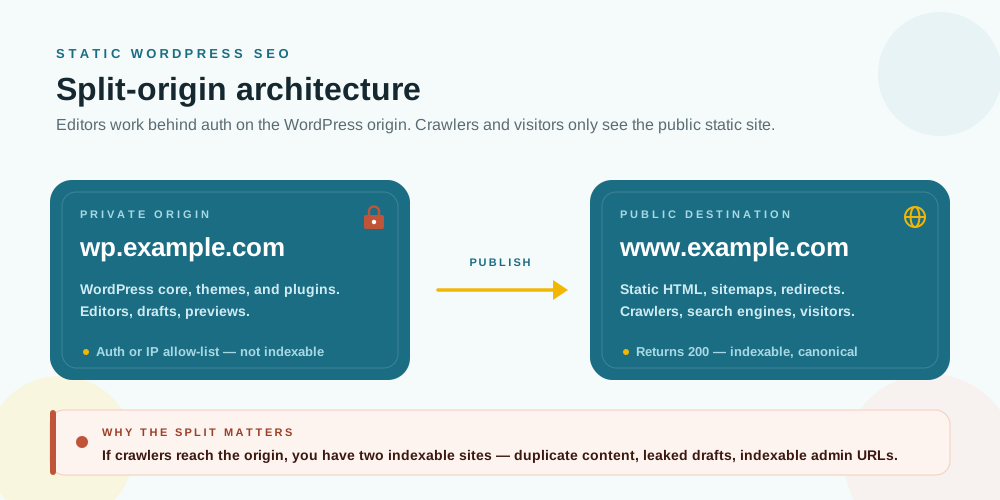
Check every SEO signal that can contain an absolute URL:
| Output | Static migration risk | Pass condition |
|---|---|---|
rel="canonical" |
Points to the WordPress origin or preview host | Points to the final public URL |
XML sitemap <loc> |
Lists origin, preview, redirected, or non-indexable URLs | Lists only final canonical public URLs |
| Internal links | Freeze old dynamic links into the static site | Link directly to canonical public URLs |
Open Graph og:url |
Social metadata disagrees with canonicals | Uses the same public URL as the page |
| Structured data | Breadcrumbs or entity URLs reference the origin | Uses public URLs where URL fields are present |
| Hreflang | Alternates point to non-canonical or preview URLs | Uses reciprocal, crawlable, canonical public URLs |
| Feeds and alternate links | Feed readers discover the origin | Use public URLs or are intentionally excluded |
| Redirect targets | Old URLs redirect to origin or temporary preview routes | Redirect to final public destinations |
Google’s canonical guidance is practical here because it is specific: avoid conflicting canonical signals and use absolute canonical URLs. A sitemap URL, canonical tag, redirect target, and internal link should not each point to a different version of the page.
If your publishing tool has a destination URL setting, this is where it matters. For Staatic users, Build Settings define where the static site will be hosted, and generated internal URL references are transformed toward that configured destination. Staatic also supports relative and offline destination modes, so do not treat every configuration as an absolute public URL setup.
For SEO-sensitive output, an absolute public Destination URL is usually easiest to validate. The advanced publication customization guide calls out canonical URLs and Open Graph tags as cases where this matters. Do not stop at configuration. Validate the generated output. Treat URL transformation as implementation support, not as a reason to skip review.
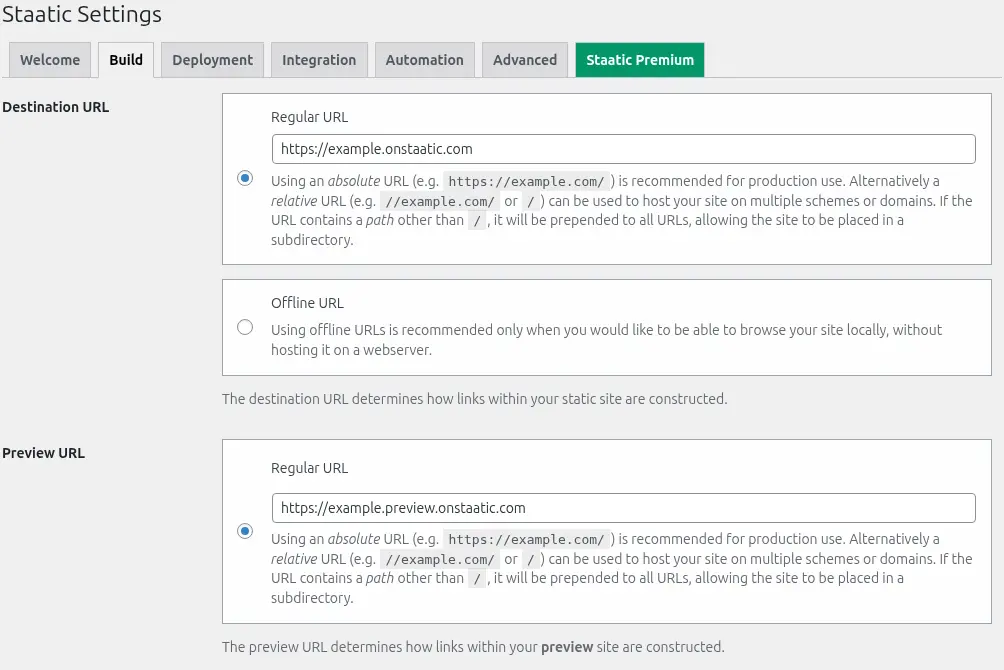
Staatic handles common URL locations such as HTML link attributes, sitemap <loc> values, RSS output, and base-domain URLs that appear in plain, JSON-escaped, or URL-encoded form. That reduces manual cleanup, but it is not a substitute for inspecting plugin-specific structured data, hreflang, feeds, and metadata in the published artifact.
Phase 3: inspect the published static output
Do not approve the migration by checking WordPress admin or browsing a preview casually. Inspect the generated static output.
If your publishing workflow exposes resources, logs, or downloadable artifacts, use them. For Staatic users, the Reviewing interface shows publication status, summary, resources, and logs. Publication details are retained for up to seven days. The resources list shows pages and assets identified during crawling, and resources can be downloaded for inspection. The logs help explain failed publications or failed resources.
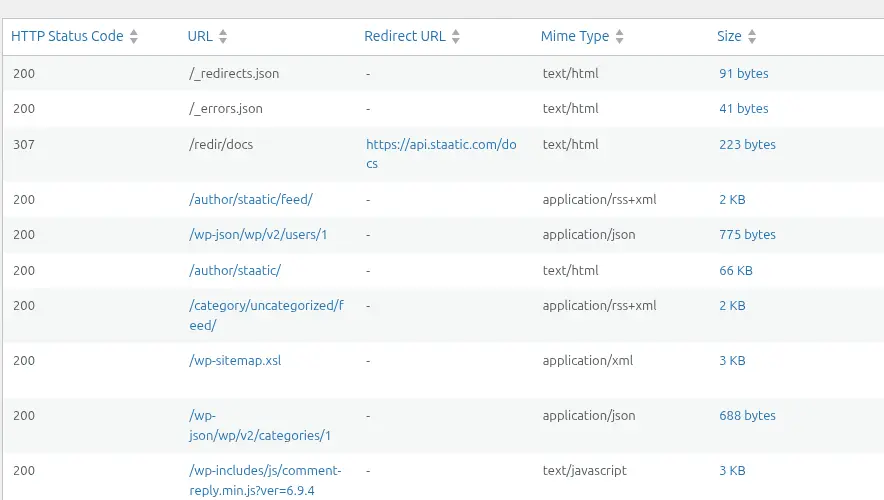
Use the publication artifact as the source of truth for launch review:
- confirm expected pages were included
- confirm important media files and downloads were included
- confirm
/wp-sitemap.xmland/robots.txtare present when expected - search the output for origin and preview hostnames
- inspect representative HTML files for canonicals and metadata
- verify excluded URLs were actually excluded
- verify Additional URLs and Additional Paths filled known crawl gaps
- verify Additional Redirects or crawled redirect origins reached the deployed target when the target supports serving redirects
Search for obvious origin leaks:
curl -s https://www.example.com/wp-sitemap.xml | grep "wp.example.com"Crawler-based static publishing follows links. If an important page exists in WordPress but is not linked, not in a sitemap, and not listed as an Additional URL, the missing page starts as a publication-scope problem before launch and becomes an SEO problem if it disappears, redirects incorrectly, or returns the wrong status after launch.
The safest review question is not “does the homepage work?” It is “does the generated public artifact match the URL inventory we expect search engines to crawl?”
Phase 4: validate canonicals before you validate rankings
Canonical tags are not an override switch. They are a strong signal, and Google can choose a different canonical if the rest of the site disagrees.
Before launch, inspect representative pages from every template type:
- home page
- top landing pages
- blog posts or articles
- pages with manually edited SEO metadata
- category, tag, author, and date archives if they are indexable
- paginated archives
- custom post type archives
- multilingual or regional pages
- pages with custom canonicals
For each page, check:
- the final URL returns
200 - the canonical tag uses an absolute public URL
- the canonical URL returns
200 - the canonical URL is not redirected
- the sitemap lists the same URL if the page should be indexed
- internal links point to the canonical form
- Open Graph and structured-data URLs do not contradict the canonical
Example of a launch-blocking mismatch:
<link rel="canonical" href="https://wp.example.com/services/" />Expected on the public static site:
<link rel="canonical" href="https://www.example.com/services/" />Avoid using noindex as a substitute for canonicalization within the same site. Google explicitly says noindex is not the preferred way to choose a canonical. Use redirects and canonical tags for duplicate URL consolidation. Use noindex when a page should not be indexed at all.
WordPress-specific behavior is worth checking because origin-host output is not usually a bug. WordPress core sitemaps are built from WordPress URL helpers such as home_url(), and singular canonicals are emitted through rel_canonical() using wp_get_canonical_url(). SEO plugins such as Yoast SEO and Rank Math usually do sensible things for a normal WordPress install, such as self-referencing canonicals and excluding noindex URLs from sitemaps. In a split-origin setup, the question is not whether WordPress or the plugin is sensible. The question is whether the final static output reflects the public destination domain.
For plugins whose sitemap delivery depends on dynamic rewrite rules, confirm that the static host is serving the generated sitemap files directly rather than relying on WordPress runtime behavior.
Phase 5: publish a sitemap that contains only canonical public URLs
An XML sitemap is not a ranking guarantee. It is a discovery and canonicalization hint. That makes it valuable only when it is clean.
Google’s sitemap guidance says sitemap URLs should be fully qualified absolute URLs and should represent the URLs you want to appear in search results. It also says sitemap submission does not guarantee crawling or indexing.
For static WordPress, the sitemap should pass these checks:
- every listed URL uses the public destination host
- every listed URL returns
200 - no listed URL redirects
- no listed URL is
noindex - no listed URL points to the WordPress origin, preview host, admin area, internal search results, form handlers, or private paths
- sitemap index files and child sitemap files use the same public host
robots.txtreferences the public sitemap if it references one at all
Be careful with <lastmod>. Google says it can use accurate lastmod values as a crawl scheduling signal, but the value should represent the last significant update. A static build should not stamp every page with the deployment time unless every page really changed. If your workflow cannot keep lastmod accurate, omission is safer than inventing precision.
Staatic includes /wp-sitemap.xml by default, and includes /robots.txt by default when publishing from the domain root. That is a helpful starting point, not a pass. Review the sitemap as part of the generated static site, not only as it appears on the WordPress origin.
Staatic documentation recommends including an XML sitemap in Additional URLs because the crawler starts at the front page and follows discovered links. A sitemap can help include content that is not obvious from normal navigation and gives clearer publication progress visibility. If you rely on partial publishing, make sure sitemap updates are part of the publication scope when content changes affect indexable URLs.
Phase 6: map redirects before launch
Redirect mapping belongs in the migration plan, not in post-launch cleanup.
If a URL has moved permanently, use a permanent server-side redirect where the deployment target supports it. Google recommends server-side redirects whenever possible, treats 301 and 308 as permanent redirects, and advises redirecting old URLs directly to their final destinations. In most migrations, 301 remains the safest default unless the platform team has a specific reason to use 308.
Build a redirect map with at least these columns:
| Old URL | New URL | Status | Reason | Owner |
|---|---|---|---|---|
/old-post/ |
/guides/new-post/ |
301 |
Blog reorganization | SEO |
/downloads/file.pdf |
/wp-content/uploads/file.pdf |
301 |
Media path changed | Technical |
/category/news/ |
/news/ |
301 |
Section moved | SEO |
Then test the map against the deployed static target, not only against local rules.
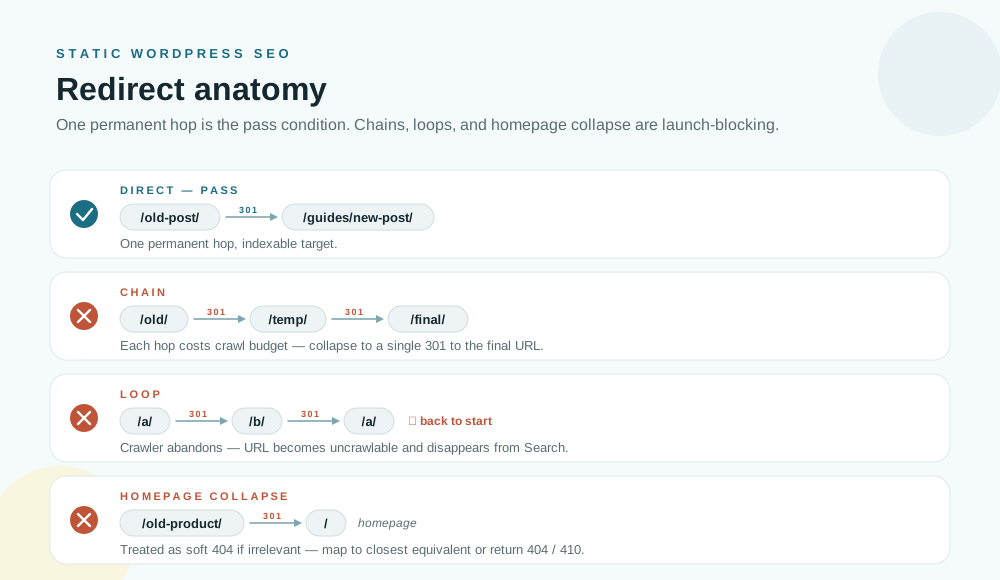
Launch-blocking redirect checks:
- old important URLs redirect to the final public destination
- permanent moves use
301or308where supported - temporary redirects are not used for permanent migrations by accident
- redirect chains are minimized, ideally to a single hop
- redirect loops do not exist
- old URLs do not redirect to the homepage unless the homepage is genuinely the closest relevant destination
- HTTP-to-HTTPS and
wwwor apex normalization are handled consistently - redirected URLs are not listed in the sitemap
- redirect targets are canonical, indexable, public URLs
Staatic can include redirects encountered during crawling and supports Additional Redirects for redirects that do not exist in the dynamic WordPress environment. It can also import redirects from several WordPress redirect and SEO plugins. That helps keep redirect rules close to the WordPress migration workflow.
Be explicit with status codes. Staatic Additional Redirects support 301, 302, 307, and 308, and omitted statuses default to 302. For permanent SEO migrations, set 301 or 308 deliberately instead of relying on defaults.
Staatic can pick up redirect origins from supported redirect and SEO plugins, including Redirection, Safe Redirect Manager, Simple 301 Redirects, Rank Math, and Yoast Premium. That does not mean every dynamic or regex rule from every plugin becomes a deployed static redirect. Test the deployed result.
Do not collapse unrelated retired URLs into the homepage. Google can treat irrelevant old-to-homepage redirects as soft 404s, so map old URLs to the closest equivalent page, a relevant parent section, or a real 404 or 410 when no replacement exists.
The final behavior still depends on the deployment target. A redirect setting only matters if the static host or CDN serves the right status code to users and crawlers.
Phase 7: choose one URL shape and enforce it
Trailing slashes are not an SEO superstition. Slash and non-slash URLs are separate URLs outside the domain root. Either convention can work, but both should not resolve as independent pages.
WordPress sites commonly use directory-style permalinks such as /example-page/. Static hosts may also expose file-like variants such as /example-page/index.html depending on deployment behavior. If those variants return 200 independently, they can split signals and create crawl noise.
Pick one public form and make the rest redirect or disappear:
https://example.com/page/https://example.com/pagehttps://example.com/page/index.html
For most WordPress migrations, preserving the existing permalink convention is the least risky option. If the site already uses trailing slashes and those URLs are indexed, keep them unless there is a strong reason to change.
Check the same consistency for:
- lowercase and uppercase path variants
- encoded characters
- date-based permalink patterns
- category base changes
- query parameters that used to produce indexable pages
- old
/blog/,/news/, or/articles/section paths - media files and PDFs
Google’s URL structure guidance favors simple, descriptive URLs. Static publishing can help by reducing dynamic parameter URLs, but only if the old URL forms redirect cleanly to the chosen public shape.
Some static publishing tools can also normalize URL case. Staatic has an Advanced Setting to enforce lowercase URLs, but it is disabled by default and should be chosen deliberately. It can help avoid duplicate-content issues from case-sensitive URLs, but it can also change URL behavior if the site intentionally uses mixed-case paths.
Phase 8: control preview, staging, and origin indexation
Preview workflows are part of a healthy release process. Publicly indexable previews are not.
Google’s guidance gives a clear hierarchy. Password protection is the safest way to keep private content out of Search. noindex can work when a page is crawlable and Google can see the directive. robots.txt is not a reliable way to keep HTML pages out of search results, and it prevents Google from seeing noindex on blocked pages.
Use this table when deciding how to protect non-production URLs:
| Control | Good for | Risk |
|---|---|---|
| Password protection or access control | Private origins and previews | Requires operational setup |
noindex |
Crawlable previews that should not be indexed | Does not work if blocked by robots.txt |
robots.txt disallow |
Reducing crawl activity | Not reliable for keeping HTML out of Search |
| Public preview URL with no controls | Quick review links | Can become an indexed duplicate |
Static hosting platforms often make preview URLs easy. That is good for review and risky for SEO if no one owns indexation control. Cloudflare Pages and Netlify Deploy Previews, for example, can create publicly reachable preview environments. Those environments need explicit controls.
Staatic supports a separate Preview URL for deployment methods that support preview publications. Preview publications use that Preview URL as the build destination URL when preview mode is active. That does not mean every preview deployment is automatically protected with noindex, robots rules, or authentication. Assume preview publications are public until your deployment target proves otherwise, and verify preview indexation in your own deployment.
Also protect the WordPress origin after cutover. The Preparation guide recommends restricting access to the dynamic origin to avoid duplicate content and reduce exposure of the live WordPress installation. If the origin uses HTTP Basic Authentication, configure the static publishing tool so it can still crawl the origin. If you use IP restrictions, make sure the crawler can still reach the origin. If the origin must remain reachable for editors, use access control and make sure it is not competing with the public static site.
Phase 9: ask your hosting team the right questions
Static files can be correct while the hosting layer still serves the wrong SEO signals. Search engines evaluate response codes, redirects, canonical links, and crawlable content. A redirect that is correct in a spreadsheet still fails if the deployed platform serves a different status.
Use this as a deployment review table:
| Target | What to verify |
|---|---|
| Cloudflare Pages | Unspecified _redirects status defaults to 302, query-parameter matching is not supported in _redirects, large maps may need Bulk Redirects, and preview or *.pages.dev host indexation needs an explicit decision |
| Netlify | Unspecified redirects default to 301, rewrites use status 200, query parameters and domain-level redirects are supported, trailing slash normalization is handled by Pretty URLs, and Deploy Preview indexation needs an explicit decision |
| S3 or CloudFront | Website redirect behavior, CloudFront response-code overrides, custom error pages that should not return 200 for missing content |
| GitHub Pages | Custom domain, apex/www, and HTTPS behavior; do not assume first-party path-level redirect tooling without confirming your implementation |
| Apache or Nginx output | Generated rewrite rules are deployed, enabled, and returning the expected status codes |
The S3 and CloudFront case deserves special caution. A catch-all error page that returns 200 for missing URLs can create soft 404 problems. A missing page should not look like a successful page unless it is intentionally serving real, indexable content.
For Staatic users, redirect serving is deployment-target dependent. Filesystem deployments can generate Apache or Nginx rules, and Netlify deployments can generate redirect configuration. Staatic’s S3-compatible deployment documentation lists HTTP redirect support as limited to 301; verify any CloudFront or provider-specific behavior separately. Do not assume every deployment method serves path-level redirects in the same way. Validate the target you actually use.
When in doubt, test with real requests:
curl -I https://www.example.com/old-post/
curl -I https://www.example.com/services/
Phase 10: use Search Console after launch
After cutover, monitoring should confirm that Search sees the same URL model you validated before launch.
Before launch, verify both old and new Search Console properties, including protocol and host variants that matter for the move. After launch, submit the public sitemap and inspect priority URLs.
Post-launch checks:
- sitemap can be fetched and parsed
- priority URLs are indexable
- Google-selected canonical matches the declared canonical on important pages
- old URLs redirect to the new final URLs
- preview and origin URLs are not indexed
- unexpected
noindexdirectives did not carry into production - 404s and soft 404s are reviewed
- crawl errors are investigated instead of ignored
- organic traffic and indexed URL counts are monitored during the transition
Some fluctuation is normal during a URL move. Google’s site move documentation says visibility can fluctuate temporarily. That does not mean every drop should be ignored. Separate expected migration noise from preventable technical mistakes.
For URL moves, keep redirects in place for at least a year where practical, and longer for URLs that still receive users, links, or search traffic.
Final launch gates
Use this shorter list as the sign-off view after the detailed checks above.
| Gate | Pass condition | Owner |
|---|---|---|
| URL inventory | Current crawl, top organic URLs, important media, archives, and moved URLs are captured | SEO or implementation lead |
| Public URL model | Canonicals, sitemap entries, links, metadata, feeds, media URLs, and redirect targets use the public destination | SEO and developer |
| Publication artifact | Generated output contains expected pages, assets, /wp-sitemap.xml, /robots.txt, exclusions, and additional URLs |
Developer or operator |
| Redirect behavior | Old URLs, slash variants, HTTP/HTTPS, and apex/www variants resolve with the intended status and final target |
Developer or hosting team |
| Preview and origin controls | WordPress origin, preview URLs, and staging hosts are authenticated or intentionally crawlable with verified noindex |
Operator |
| Host/CDN semantics | Missing URLs return 404 or 410, not accidental 200; platform redirect defaults are known |
Hosting team |
| Search Console | Sitemap is submitted, priority URLs are inspected, and post-launch monitoring is assigned | SEO lead |
Do not cut over until someone owns rollback for indexing-critical failures such as origin-host canonicals, broken redirects, sitemap leaks, accidental noindex, or soft 404 behavior.
Where Staatic fits
The practical goal is to make the static site reviewable before launch: one public URL model, clean sitemaps, correct redirects, protected previews, and verified deployment behavior. Staatic supports that workflow through destination and preview URL settings, additional URLs and paths, exclusions, redirects, publication resources, logs, and deployment settings.
The most relevant Staatic references are:
- Preparation for the private-origin and public-static architecture
- Build Settings for Destination URL, Preview URL, Additional URLs, Additional Paths, Excluded URLs, and Additional Redirects
- Publishing for the publication workflow
- Reviewing for publication resources and logs
- Deployment Settings for target-specific deployment behavior
- Forms Integration and Search Integration when dynamic public features need a static-compatible replacement
Staatic does not remove the need for SEO review. It gives teams a controlled way to inspect the generated output and deployment behavior before users and crawlers depend on it.