Run every client site from one account
Each client site has a private WordPress and a static public site. Your team signs in to every site, and each client sees only their own.
Everyone signs in as themselves
Your team and your clients each get their own login, so nobody shares a WordPress password. When someone leaves, remove them and check the WordPress users they had.
A role per person in the account
- OwnerOne per account
- Holds the account, and alone can close or transfer it.
- AdministratorProfessional and up
- Manages billing, the team and every site.
- MemberProfessional and up
- Works on every site.
- CollaboratorEvery plan
- Works only on the sites you select, without a team seat.
Permissions per site
- Site Access
- Opens the site in the Staatic dashboard and in WordPress.
- Site Management
- Adds backups, integrations, SFTP and the database, and signs in to WordPress as the site’s highest-role user, usually an administrator.
- Form Moderation
- Reviews the site’s form submissions.
The dashboard’s Login button opens WordPress with a short-lived link.
A client’s editor, on their own site only
Invite the bakery’s editor as a collaborator and tick only their site. Without Site Management they edit content and review form submissions, but can’t touch backups, integrations or the database.
Your team works on every client site; each client sees only their own.
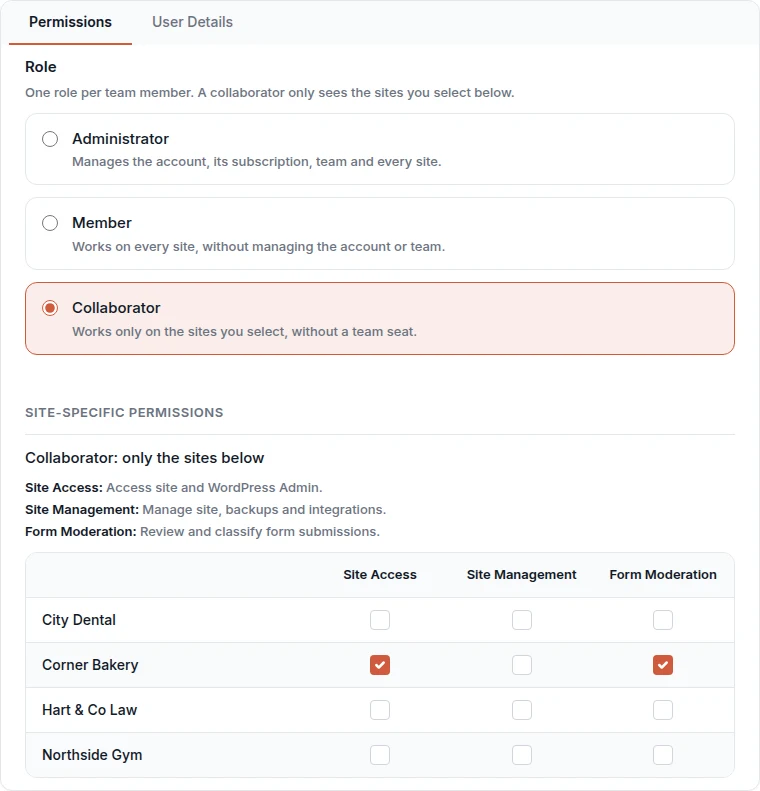
What each permission opens in WordPress, and how WordPress Login picks the user.
Team access docsA new plugin flaw is not twenty emergencies
Visitors never run your plugins, so a flaw in one can’t be used against the public sites. Paths you keep live with origin rules can still be attacked, so protect them like any live site.
-
Each client site is a public WordPress
Every visitor and bot reaches the plugin, on each site until you update it.
20 sites to update tonight
-
Each client site is published with Staatic
Visitors get finished pages. The plugin runs only in each client’s private WordPress, behind a password prompt.
20 updates, in working hours
-
One broken update stays small
If an update breaks one client’s WordPress, visitors keep getting the last version you published while you fix it. Only a new publication, manual or scheduled, changes that site.
-
Each site runs on its own
Every client site has its own WordPress, database user and resource limits. Subsites of one Multisite network share one install.
What a scanner finds on a Staatic site, and what you still look after.
SecurityTaking on a client site
The client’s current site stays online until you point the domain at Staatic.
-
Bring the site in
Create a Cloud site and import the client’s All-in-One WP Migration, UpdraftPlus or Duplicator backup, or a ZIP or tar.gz of its files and database. Nothing goes public until you publish. Importing a site
-
Let the client approve it
Publish to the site’s preview address and send the client the link. Search engines don’t index it.
-
Go live on their domain
Publish to the live site, then add the DNS records the dashboard shows. Connecting a domain
-
Give the client their login
Invite their editor as a collaborator. They start with every permission, so turn off Site Management if they only edit content. How WordPress Login picks the user
Rather not do it yourself? For a limited time we move sites to Staatic Cloud for free. Free onboarding service
On every client site, in the dashboard
- Automatic backups
- SFTP and phpMyAdmin
- Its own PHP version
- Homepage speed tests
One bill for all your sites, or one per client
A subscription covers every site in one account.
In your account, you pay
Cloud Starter includes 1 site, Professional up to 3 and Enterprise unlimited. On Starter and Professional, each extra site costs €19 a month, on the same invoice.
All sites in the account share its bandwidth, form submissions and searches. We email you at 80% and 100% of each allowance; use beyond it is billed at the pricing-page rates.
In the client’s account, they pay
The client registers, adds their site and invites you: as a collaborator on any plan, or as an administrator from Professional up.
The account switcher takes your one login to every account you belong to.
Staatic Cloud starts at €28 a month. Every plan and what it includes.
PricingBefore you move client sites
- Can we white-label or resell it?
- Not under your brand: clients sign in to the Staatic dashboard, and visitors only see the client’s own site and domain. Anyone can join the affiliate program, which pays 20% of every payment from a customer you refer, until they end their subscription.
- What about shops, member areas and logins?
- Logins, carts and member areas need a live server, so they run elsewhere, such as a shop on a subdomain. Hybrid static sites keep single paths such as
/wp-json/*live, on your own server or on the site’s WordPress with the always-on add-on (€9 a month per WordPress instance). See what works on static - Can we move one site to another account?
- Plan for it: ownership moves per account, not per site. If a client may leave with their site, let them register and invite you from the start.
- Can client sites run on our own hosting?
- Yes, so there’s no lock-in: the self-hosted plugin publishes to Netlify, Amazon S3, SFTP, GitHub, a local directory or a ZIP. Team management needs the Professional license. Self-hosted plans
- What support and uptime do we get?
- Professional includes a 99.9% uptime SLA. Enterprise agreements can raise site delivery to 99.95% and add priority support. Compare the plans
Try it on one client site, free for 14 days
The trial includes one Cloud site and team access, so you can import a client site and invite a colleague and the client.
- No payment details needed
- The trial ends automatically
- You keep editing in WordPress
“Staatic is an excellent solution for us. It brings all our clients’ hosting under one dashboard and enables the sites to be fast and secure. The support we have got is second to none and we highly recommend this service.”